Best AI meeting assistant Tools for Smarter Meeting Notes
September 2, 2026
1
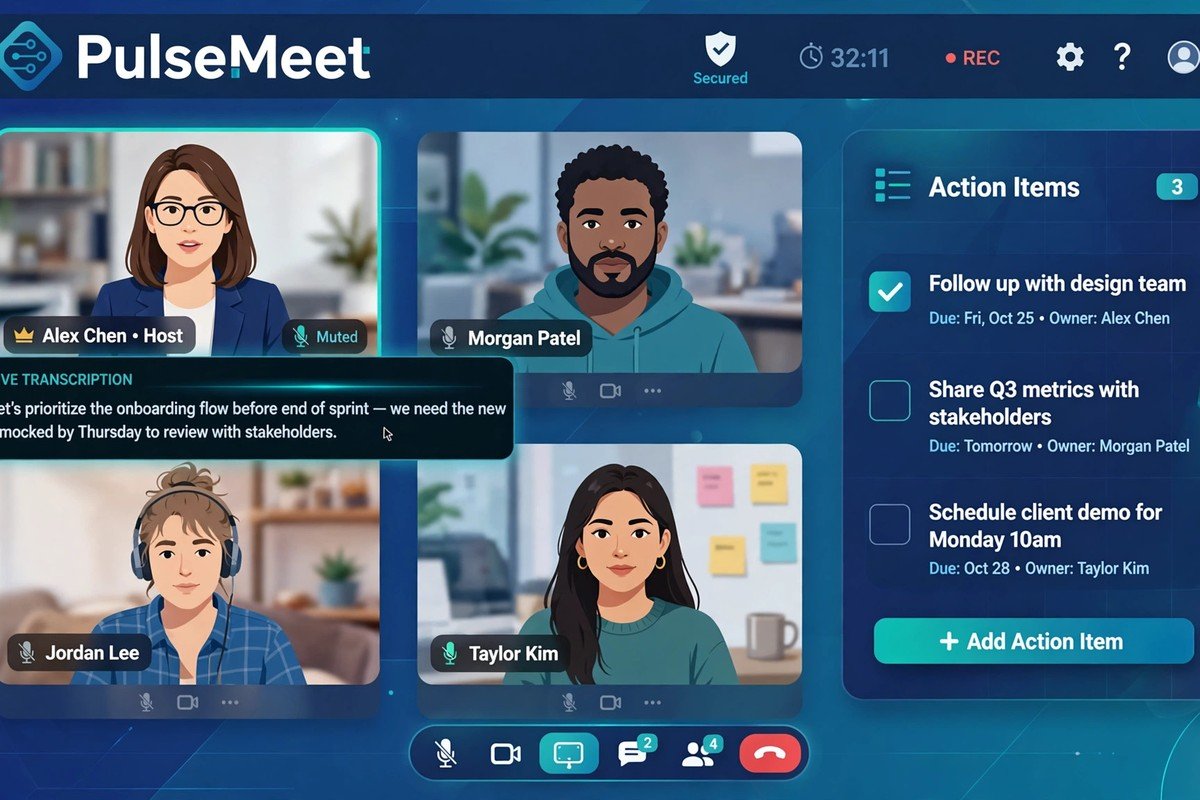
An AI meeting assistant can record or capture a meeting, turn conversations into searchable transcripts, summarise key points, identify decisions and action items, and help teams follow up
An AI meeting assistant can record or capture a meeting, turn conversations into searchable transcripts, summarise key points, identify decisions and action items, and help teams follow up faster. In 2026, the best Domo Artificial Intelligence Tools are moving beyond simple transcription by connecting meeting insights with CRMs, project-management platforms, calendars and other business workflows.
But choosing the right tool is not as simple as picking the one with the most features. Your ideal meeting assistant depends on how you meet, which platform you use, your privacy requirements, and whether you need basic notes or deeper meeting intelligence.
What Is an AI Meeting Assistant?
An AI meeting assistant is software that uses artificial intelligence to capture and analyse conversations. Depending on the product, it can:
Transcribe meetings in real time
Identify speakers
Summarise discussions
Extract decisions and action items
Create follow-up emails
Search previous meetings
Answer questions about conversations
Send information to CRM or project-management tools
Provide meeting analytics and conversation insights
The important difference in 2026 is that a good assistant should help you act on the meeting, not simply create a transcript.
Best AI Meeting Assistant Tools in 2026
There is no single winner for every user. Recent 2026 comparisons consistently highlight different strengths across tools, from free meeting notes and transcription to CRM automation and privacy-focused recording.
Tool
Best for
Standout strength
Fathom
Individuals and small teams
Simple AI summaries and generous free usage
Otter.ai
Transcription and searchable notes
Real-time transcription and meeting search
Fireflies.ai
Teams and sales workflows
Integrations, search and meeting intelligence
Granola
Personal and privacy-conscious notes
Bot-free note-taking and AI-enhanced notes
Avoma
Sales and revenue teams
CRM updates, notes and conversation intelligence
tl;dv
Distributed teams
Meeting recordings, clips and searchable insights
Microsoft 365 Copilot
Microsoft Teams users
Built directly into the Microsoft ecosystem
Google Gemini in Meet
Google Workspace users
Native meeting notes and Google Docs workflow
1. Fathom: Best for Simple AI Meeting Notes
Fathom is a strong option for people who want meeting recording, transcription and AI-generated summaries without a complicated setup.
It is particularly attractive for individuals and smaller teams that want to reduce manual note-taking. Recent 2026 comparisons have also highlighted its generous free offering.
Best for: freelancers, consultants, small businesses and everyday video meetings.
Watch out for: teams that need advanced CRM or enterprise conversation intelligence may need a more specialised platform.
2. Otter.ai: Best for Transcription and Search
Otter remains one of the better-known AI meeting assistants for real-time transcription. It can turn conversations into searchable knowledge and now includes AI-powered questions and follow-up capabilities.
Best for: people who prioritise accurate transcripts, speaker identification and searchable meeting history.
Watch out for: users who want a completely bot-free experience should check the recording options available for their workflow.
3. Fireflies.ai: Best for Integrations and Team Workflows
Fireflies is particularly useful when meeting information needs to move somewhere else after the call.
Its AI can analyse transcripts, answer natural-language questions and search across multiple meetings. Its broader integration ecosystem also makes it useful for sales and customer-facing teams.
Best for: sales teams, customer success teams and businesses connecting meetings with CRM or productivity systems.
4. Granola: Best for Bot-Free Meeting Notes
Granola takes a different approach from traditional meeting bots. It works as an AI notepad and combines your own notes with meeting transcription and calendar context to create enhanced notes.
This can be useful when you do not want an obvious AI bot appearing as another participant in the meeting.
Best for: executives, consultants and professionals who want more control over their notes.
Watch out for: its workflow and feature set are different from traditional all-in-one conversation intelligence platforms.
5. Avoma: Best for Sales and Revenue Teams
Avoma goes beyond meeting notes by connecting conversations with follow-up emails, CRM updates, searchable transcripts and conversation intelligence. Its current platform supports integrations with systems including Salesforce, HubSpot, Slack, Zoom, Microsoft Teams and Google Meet.
Best for: sales, customer success and revenue teams that need meeting data to become part of their CRM workflow.
Watch out for: smaller teams may not need its deeper sales-focused capabilities.
6. tl;dv: Best for Sharing Meeting Insights
tl;dv is useful for teams that record many meetings and need to revisit specific moments rather than watch an entire call.
It is particularly relevant for distributed teams, sales teams and research workflows where clips and searchable meeting information can save review time.
Built-In AI Meeting Assistants Are Now a Serious Alternative
One content gap in many “best AI meeting assistant” lists is the assumption that you always need a separate application.
That is no longer true.
Microsoft Teams + Copilot
If your organisation already uses Microsoft Teams, Microsoft 365 Copilot can summarise discussions, identify speakers, suggest action items and answer questions about meeting content. Teams Recap can also bring together recordings, transcripts, notes and follow-up tasks.
Google Meet + Gemini
Google Meet’s Take notes for me can automatically organise meeting notes in Google Docs and provide a “Summary so far” for people who join late. Google also provides Gemini features for asking questions about discussions and identifying decisions and action items.
Zoom AI Companion
For organisations already working inside Zoom, its built-in AI capabilities can be a practical alternative to adding another meeting assistant to the technology stack. Recent comparisons place Zoom among the strongest built-in options for meeting summaries and action items.
Simple rule: if your company already pays for an AI-enabled meeting platform, check its native capabilities before buying another notetaker.
How to Choose the Right AI Meeting Assistant
Do not choose a tool based only on transcription accuracy or the number of integrations.
Check these factors first:
1. Recording method
Does the tool join your meeting as a bot, record from your desktop, or support both?
Bot-free recording can be important for client calls, interviews and sensitive conversations.
2. Meeting platform support
Check whether it works reliably with:
Zoom
Google Meet
Microsoft Teams
Phone calls
In-person meetings, if required
3. Notes quality
A useful summary should separate:
Key discussion points
Decisions
Action items
Owners
Deadlines
Open questions
Follow-up requirements
4. Integrations
For business users, integrations can be more valuable than another AI feature.
Look for connections with:
Salesforce
HubSpot
Slack
Notion
Asana
Jira
Linear
Google Workspace
Microsoft 365
5. Privacy and consent
Meeting assistants may process sensitive customer, employee or business information.
Before deploying one across a company, check its recording permissions, data-retention policies, security controls, compliance requirements and whether participants need to be notified or provide consent.
This is especially important for customer calls, recruitment interviews and confidential internal meetings.
6. AI accuracy
Never assume an AI-generated summary is perfect.
Names, numbers, technical terms, commitments and deadlines can occasionally be misunderstood. Microsoft itself advises users to verify AI-generated meeting content because it can be inaccurate or incomplete.
AI Meeting Assistant vs Traditional Note-Taking
Traditional note-taking forces someone to divide their attention between listening and writing.
An AI meeting assistant can handle the first layer of documentation automatically.
That means participants can focus more on:
Asking better questions
Understanding customers
Making decisions
Building relationships
Contributing to discussions
The biggest productivity gain, however, comes after the meeting. Turning a conversation into assigned tasks, CRM updates, follow-up emails and searchable knowledge is more valuable than simply receiving a transcript.
What Makes an AI Meeting Assistant Actually Useful?
A strong meeting assistant should answer five questions after every important meeting:
What was discussed?
What was decided?
What needs to happen next?
Who is responsible?
Where can we find this information later?
If a tool only gives you a long transcript, it is functioning more like an automated transcription service than a complete meeting assistant.
The strongest platforms increasingly connect the full workflow: meeting preparation → conversation capture → summary → action items → follow-up → searchable knowledge. This broader definition is also emerging across current 2026 product comparisons.
Best AI Meeting Assistant by Use Case
Best for free meeting notes: Fathom
Best for transcription: Otter.ai
Best for integrations: Fireflies.ai
Best for bot-free notes: Granola
Best for sales teams: Avoma
Best for meeting clips and distributed teams: tl;dv
Best for Microsoft Teams: Microsoft 365 Copilot
Best for Google Meet: Gemini
Best for Zoom users: Zoom AI Companion
These recommendations should be treated as use-case matches rather than an absolute ranking. Pricing, feature availability and plan limits can change, so check the vendor’s current plan before making a purchasing decision.
An AI meeting assistant does more than transcribe conversations.
The best tools turn meetings into summaries, decisions and actionable follow-ups.
Fathom is a strong starting point for individuals and small teams.
Otter is a solid choice for transcription and searchable meeting knowledge.
Fireflies is useful for integration-heavy workflows.
Granola stands out for a bot-free, personal note-taking approach.
Avoma is particularly suited to sales and revenue workflows.
Microsoft Teams and Google Meet users should evaluate their built-in AI features before buying another tool.
Privacy, consent, integrations and accuracy matter as much as AI features.
Conclusion
The best AI meeting assistant is not necessarily the tool with the longest feature list. It is the one that fits your meeting platform, privacy requirements and workflow while reliably turning conversations into useful actions.
For simple notes, start with a lightweight option such as Fathom or Otter. For CRM-driven sales workflows, consider Fireflies or Avoma. If avoiding meeting bots matters, Granola is worth evaluating. And if your organisation already relies heavily on Teams, Google Meet or Zoom, explore the platform’s native AI capabilities first.
The real value of AI meeting technology is not saving a few minutes of typing. It is making sure that important conversations become searchable knowledge, clear decisions and completed actions.
Frequently Asked Questions
1.What is an AI meeting assistant?
An AI meeting assistant is software that captures meeting conversations and uses AI to create transcripts, summaries, action items, decisions and other useful meeting insights.
2.What is the best AI meeting assistant in 2026?
There is no universal winner. Fathom is a strong choice for simple meeting notes, Otter for transcription, Fireflies for integrations, Granola for bot-free notes, and Avoma for sales and CRM workflows.
3.Can an AI meeting assistant take notes automatically?
Yes. Many AI meeting assistants can automatically capture a meeting and generate structured notes, summaries and action items. Google Meet and Microsoft Teams also provide native AI meeting-note features for eligible plans.
4.Are AI meeting assistants safe for business meetings?
They can be, but businesses should review security, privacy, retention, access controls and consent requirements before using them for sensitive meetings. AI-generated notes should also be checked for important facts and commitments.
5.Do I need a separate AI meeting assistant?
Not necessarily. If you already use Microsoft Teams, Google Meet or Zoom, your existing platform may provide AI meeting summaries and notes. A separate tool becomes more attractive when you need advanced integrations, cross-platform support, specialised sales intelligence or a different recording method.
[…] terms, this affects anyone using AI for customer service, research, or internal reporting. AI meeting assistant Tools can go beyond simple question-answering by helping manage tasks such as checking a calendar, […]












1 Comment
[…] terms, this affects anyone using AI for customer service, research, or internal reporting. AI meeting assistant Tools can go beyond simple question-answering by helping manage tasks such as checking a calendar, […]